Contractor Website Checklist: What a Trades Website Needs to Get the Phone Ringing
Solve Trend8 min read
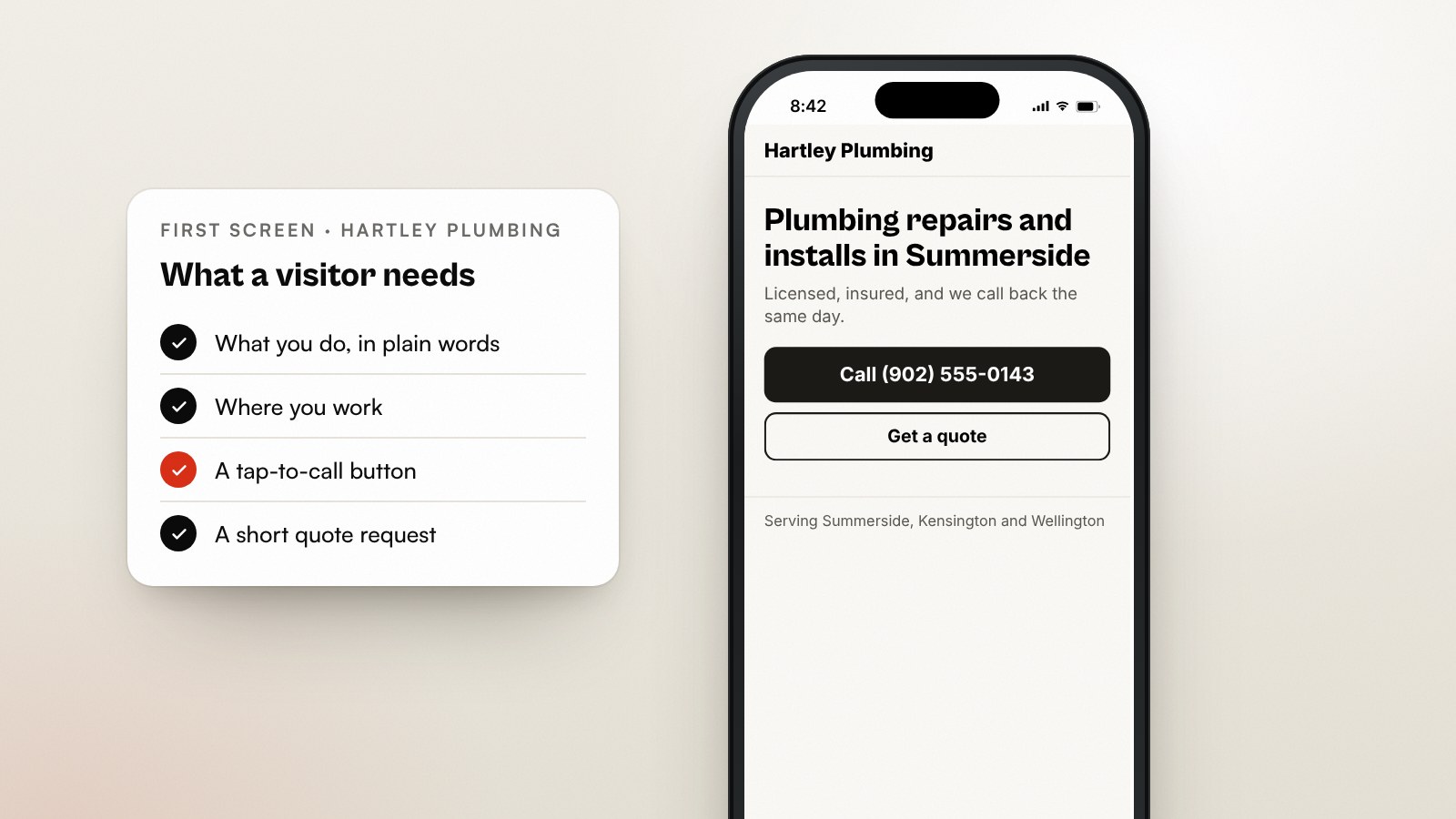
A contractor website needs to do four things on the first screen: say what you do, say where you work, give a one-tap way to call, and offer a short quote request. Everything else on this checklist supports those four. If a homeowner with a leaking pipe or a rotting deck lands on your site and has to hunt for any of them, they go back to the search results and call the next company.
This is written for owners of trades and home-service businesses: plumbers, electricians, roofers, HVAC, landscapers, renovators. It assumes you want the site to bring in work, not win design awards. Use it to audit the site you have, or as a brief for a new one.
What should a contractor's website do?
It should make the next step obvious for a person who is probably on a phone, probably in a hurry, and probably comparing you with two other companies. That person is not browsing. They have a problem, and they want to know three things quickly: do you do this job, do you work in my area, and how do I reach you.
Judge every page by that. Does it get a visitor closer to a call or a quote request, or does it just fill space? A website with six strong pages beats one with twenty thin ones.
The first screen: four things, no scrolling
Open your site on your own phone and look at what you can see before you scroll. That is the first screen, and it is the whole pitch for most visitors.
- What you do, in plain words. “Plumbing repairs and installs in Summerside” beats “Quality solutions for all your needs”. Name the trade and the type of work.
- Where you work. A town or region in the headline or right under it. Homeowners want to know you will actually come to them.
- A tap-to-call button. A real phone link, big enough for a thumb, showing the number. On a phone, a number that isn't tappable is a number people have to copy by hand.
- A short quote request. A button leading to a form with the minimum needed: name, phone, what's wrong, and where. Every extra field costs you a few people.
If you do emergency work, say so and say what hours you answer. If you don't, say that too. Setting expectations honestly saves both sides a wasted call.
The pages a contractor site actually needs
| Page | Its job | What goes on it |
|---|---|---|
| Home | Pass the first-screen test | What you do, where, call and quote buttons, a few proof points, your main services |
| One page per main service | Match what people search for | What the job involves, how it works, a rough sense of price or process, photos of your own work, a call to action |
| Service areas | Show where you work | The towns you cover, listed in plain text, plus how far you will travel |
| About | Build trust | Who you are, how long you've worked, licences and insurance, a real photo of the crew |
| Projects or gallery | Prove you do the work | Your own photos, with a line on the job: what it was, where, what you did |
| Contact | Make it easy to reach you | Phone, email, quote form, hours, service area |
The page most contractors skip is the one-page-per-service. If you do drain cleaning, water heaters and bathroom renovations, each deserves its own page. A person searching “water heater replacement” wants a page about water heater replacement, not a general “services” list where it appears as one bullet.
Trust: the proof that makes someone pick up the phone
Letting a stranger into their home is a real decision, so show them reasons to trust you. Be careful, though: trust signals only work when they are true.
- Licences and insurance. State the ones you hold. Where a licence or registration number applies in your trade, show it so people can check.
- Real photos of your own work and your own crew. Stock photos of smiling people in hard hats are easy to spot, and they make visitors wonder what you're hiding.
- Real reviews. Link to your Google reviews or show real ones with the customer's permission. Never write your own, and never offer a reward for a review. If you are building the habit, our guide to automating Google review requests shows how to ask every customer the right way.
- Years in business, warranties and guarantees. Only the ones you honour.
- A clear service region. It helps people see you are local.
- The same look as your truck and signs. A customer who saw your van should recognise the site. That takes a brand system, not just a logo.
Mobile first, because that is where people find you
Most people searching for a tradesperson are on their phone, often in the middle of a problem. Design for the phone first and check the desktop second.
- Text readable without zooming, and buttons large enough to tap without hitting the wrong one.
- The call button visible without scrolling, and ideally fixed to the screen as people scroll.
- Forms that open the right keyboard (a number pad for the phone field) and don't wipe their answers on an error.
- Pages that load fast on a weak signal. Heavy photos and autoplaying video are the usual culprits. Resize and compress every image before it goes up.
- Nothing that blocks the page on arrival, like a big pop-up or a cookie banner that covers the call button.
Test it the way a customer would. Stand outside, switch off Wi-Fi, and try to call or request a quote from a search result. If it takes more than a few taps, fix that first.
Make local search work for you
Most of your customers are within driving distance, so the way you show up in local results matters as much as the site itself. A few things on the website help.
- A clear title and heading on each page that names the service and the place, written for people first. “Furnace repair in Charlottetown” is the sort of wording that matches how someone searches.
- Your business name, address area and phone number written the same way everywhere: on the site, on your Google Business Profile and on any directories you use.
- One page per service and per main town where you have real things to say. Don't build dozens of near-identical town pages. Search engines treat them as thin, and visitors can tell. Our guide to service area pages has a template.
- Your own project photos with sensible file names and short descriptions of what's shown.
- A fast, secure site (HTTPS) that works properly on a phone.
What happens after someone calls or submits a form?
A website that works only gets the enquiry to your phone. What you do next decides whether it turns into a job. Contractors lose work here more than anywhere else, because the person who would answer is up a ladder.
- Have the quote form send you an instant notification, by text or email, and send the customer a confirmation so they know it arrived.
- Decide who answers, and by when. If you can't pick up, set up a text reply to missed calls. We explain how in missed-call text-back for contractors.
- Follow up on every quote you send. Most people go quiet because they are busy, not because they said no. Our estimate follow-up templates give you the texts.
- Plan for evenings and weekends. Our post on after-hours calls compares voicemail, answering services, text-back and AI receptionists.
Common mistakes that quietly lose jobs
| Mistake | Why it costs you | Fix |
|---|---|---|
| A phone number that isn't tappable | Customers on phones won't copy and paste it | Make it a call link, in the header and the footer |
| “Contact us” as the only call to action | Vague, and sends people to a long form | Use “Call now” and “Get a quote” instead |
| A long quote form | Every extra field loses some people | Ask for name, phone, the problem and the location |
| Stock photos everywhere | Looks generic, so it builds no trust | Use your own jobs, crew and van |
| No service area | Visitors can't tell if you cover them | List the towns you work in, in plain text |
| Text locked inside images | Search engines and screen readers can't read it | Keep headings and details as real text |
| Out-of-date information | Old hours or numbers send calls to the wrong place | Review the site every few months |
| Nobody owns the site | It slowly breaks and no one notices | Name one person to check the forms and phone link monthly |
A 20-minute audit you can do today
- Open your site on your phone. In five seconds, can you tell what you do, where, and how to call?
- Tap the phone number. Does it open the dialer?
- Submit your own quote form. Did you get a notification, and did you get a confirmation?
- Search for your main service and your town. Does a page on your site match what you searched?
- Look for proof: licences, real photos, real reviews. Is anything missing, or anything you can't back up?
- Check the date on your hours, phone number and service area.
Want the longer version as a PDF? Our free Website Playbook walks through the 12 checks we run on client websites. If three or more of those fail, a rebuild will pay for itself faster than more ads pointed at a leaky site. Our web design and development work for trades businesses starts from this checklist: a clear first screen, one page per service, and forms that reach you instantly. You can see the packages and fixed prices on our pricing page, or see how the site fits with reviews and your Google profile in contractor marketing.
How many pages does a contractor website need?
Most single-trade businesses are well served by six: home, one page per main service, service areas, about, projects and contact. Add pages only when you have something real and useful to say on them.
Do I need a blog on my contractor website?
No. A blog helps only if you will keep it up with useful, honest answers to questions your customers ask. A site with strong service pages and real photos does more for most trades businesses than an abandoned blog.
Should my contractor website show prices?
Showing a rough range or how pricing works, such as a call-out fee or a free estimate, helps filter out the wrong enquiries and builds trust. Only publish figures you will honour, and say what affects the final price.
Is a Google Business Profile enough without a website?
A profile helps people find and call you, but a website gives you room to explain each service, show your work and capture quote requests on your terms. Use both, and keep the details identical.
How often should I update my contractor website?
Check the basics every few months: phone number, hours, service area, forms. Add new project photos whenever you finish a job you are proud of.